
The myth of default macOS security
The claim that “macOS is secure by default” is dangerous because it mistakes platform security features for operational workstation posture.
Out of the box, Apple ships modern macOS with formidable protections: System Integrity Protection (SIP) locks down system directories and NVRAM variables, FileVault encrypts the APFS container with XTS-AES-128, and Gatekeeper enforces code-signing and developer notarization.
# What the defaults look like on a fresh macOS installation
$ csrutil status
System Integrity Protection status: enabled.

$ spctl --status
assessments enabled

$ fdesetup status
FileVault is On.
However, the moment a developer or security engineer configures that Mac for daily work, those default guarantees begin to unravel:
- Homebrew and Inbound Sockets: Development tools (like local Python, Node.js, and Docker daemons) trigger firewall prompts. Over time, developers allow inbound connections, and
socketfilterfwquietly whitelists interpreters across user directories. - Packet Filter Permissions: Installing Wireshark or capture utilities creates the
access_bpfgroup and installs a LaunchDaemon changing/dev/bpf*permissions to0660. Non-root processes can now capture unencrypted loopback and local network traffic without administrative passwords. - Secret Accumulation: Shell profiles (
~/.zshrc,~/.bashrc) accumulate high-value cloud tokens (AWS_SECRET_ACCESS_KEY,OPENAI_API_KEY, GitHub personal access tokens). Development projects leave world-readable.envfiles with database credentials on disk. - Persistence and Unsigned Helpers: Third-party developer tools install background daemons into
/Library/LaunchDaemons/and/Library/PrivilegedHelperTools/. If a vendor removes an uninstalled binary without cleaning its plist, a dangling LaunchDaemon is left behind, waiting for privilege escalation or binary hijacking.
To evaluate, track, and remediate this attack surface without introducing third-party risk, we engineered macharden.
The 4 audit domains of macharden
macharden organizes 54 CIS and NIST-aligned security checks across four operational domains:
| Category | Weight Range | Focus Areas | Key Security Primitives |
|---|---|---|---|
| Hardening | 4 – 10 | System integrity, kernel flags, storage encryption, lock policies | csrutil, fdesetup, spctl, defaults, bputil |
| Network | 4 – 9 | Inbound firewall, stealth mode, packet filter permissions, wireless | socketfilterfw, /dev/bpf*, ifconfig, awdl0 |
| Persistence | 5 – 8 | Startup items, background daemons, sudoers, code signatures | launchctl, plutil, /Library/LaunchDaemons, codesign |
| Secrets | 5 – 9 | Plaintext tokens in shell configs, exposed .env, Keychain locks | ~/.zshrc, ~/.docker/config.json, kern.coredump, SSH keys |
Zero-dependency auditing: native primitives vs heavy agents
Most commercial endpoint security agents require installing 150MB+ runtimes (Electron, Python, or heavy background daemons) that run as root. This introduces new vulnerabilities, triggers Gatekeeper and TCC authorization prompts, and consumes substantial system resources.
macharden takes the opposite design path: zero external dependencies. It executes purely through native macOS Zsh and system binaries:
- File and plist parsing is handled directly with
plutilanddefaults. - Binary signatures and notarization are checked using
/usr/bin/codesign -dv. - Sudoers rules, groups, and directory ACLs are evaluated with
dseditgroup,stat,awk, andsed.
To prevent checks from hanging when an internal tool triggers an interactive authentication prompt or keychain dialog, macharden wraps queries in an isolated deadline runner using a native Perl fork:
# macharden lib/audit_secrets.sh: Strict execution deadline wrapper
_sec_run_limited() {
    local secs="${1:-5}"
    shift
    [[ $# -gt 0 ]] || return 1

    perl -e '
        use strict;
        my $timeout = shift @ARGV;
        my $pid = fork();
        if (!defined $pid) { exit 1 }
        if ($pid == 0) {
            open(STDIN, "<", "/dev/null") or exit 1;
            open(STDERR, ">", "/dev/null");
            exec { $ARGV[0] } @ARGV;
            exit 127;
        }
        $SIG{ALRM} = sub {
            kill "TERM", $pid;
            select(undef, undef, undef, 0.2);
            kill "KILL", $pid;
            exit 142;
        };
        alarm $timeout;
        waitpid($pid, 0);
        exit ($? >> 8);
    ' "$secs" "$@"
}
Furthermore, when scanning shell configurations for leaked API keys, macharden uses strict regex extraction that logs only the variable name (NAME=***). Raw secret values are discarded in memory and never written to reports, stdout, or SARIF output.
Real workstation audit walkthrough
Running an audit on an engineer’s everyday Apple Silicon workstation:
# Run full 54-control audit across all domains
macharden audit --json report.json --sarif report.sarif --html report.html
1. Hardening Index and category posture breakdown
The engine computes a weighted Hardening Index between 0% and 100%, penalizing critical-weight controls more heavily than minor informational deviations:
# macOS Security Hardening Audit Report
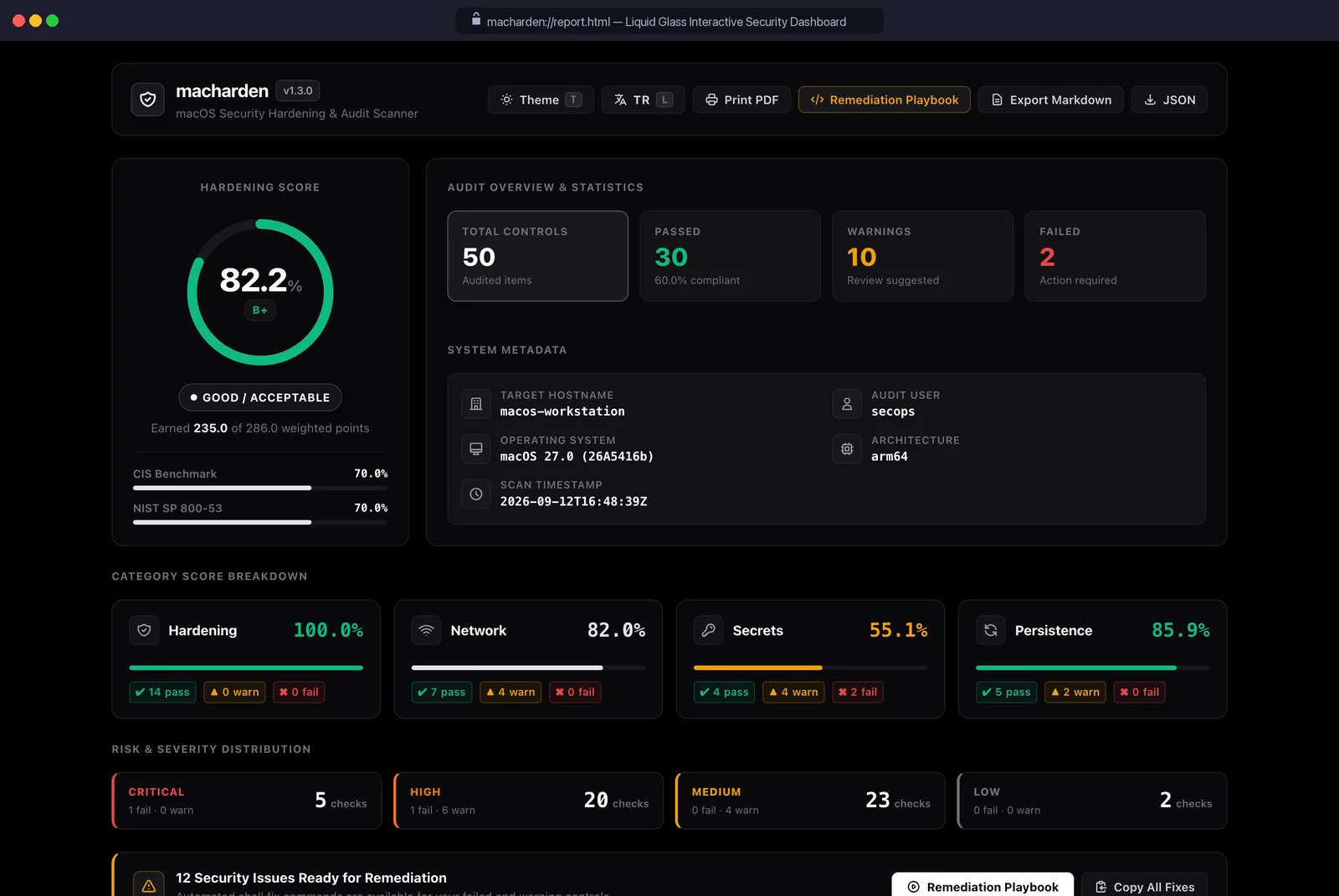
Hardening Index: 82.2% — GOOD / ACCEPTABLE (Grade: B+)

Total Checks Audited:   50
Passed Checks:          30  (🟢 PASS)
Warnings:               10  (🟡 WARN)
Failed Checks:           2  (🔴 FAIL)
Informational:           5  (🔵 INFO)
Suggestions:             3  (🟣 SUGG)
Earned Points:          235.0 / 286.0
The category posture breakdown reveals where the machine was actually vulnerable:
Category Posture Breakdown:
Hardening     100.0%  [🟩🟩🟩🟩🟩🟩🟩🟩🟩🟩]  🟢 PASS       (96.0 / 96.0 pts)
Network        82.0%  [🟨🟨🟨🟨🟨🟨🟨🟨⬜⬜]  🟡 WARN       (61.5 / 75.0 pts)
Persistence    85.9%  [🟩🟩🟩🟩🟩🟩🟩🟩⬜⬜]  🟢 PASS       (39.5 / 46.0 pts)
Secrets        55.1%  [🟥🟥🟥🟥🟥⬜⬜⬜⬜⬜]  🔴 DEFICIENT  (38.0 / 69.0 pts)
The system scored 100% on core OS hardening (SIP, FileVault, and Gatekeeper were all properly enforced). The failures occurred in the Network and Secrets domains.
2. High-risk findings on a real developer machine
Inspecting the specific audit warnings and failures uncovered classic operational security debt:
Finding 1: Application Firewall allowed incoming connections to Python (NET-03)
$ sudo /usr/libexec/ApplicationFirewall/socketfilterfw --listapps
# /opt/homebrew/Cellar/[email protected]/3.14.7/.../Python.app (Incoming: ALLOWED)
When debugging local development servers, the engineer approved an incoming connection prompt. The Application Firewall retained an indefinite inbound rule for an arbitrary Python interpreter, allowing any unauthenticated script binding to a port to receive remote network traffic.
Finding 2: Unprivileged BPF packet capture permitted (NET-04)
$ ls -la /dev/bpf*
crw-rw----  1 root  access_bpf  0x17, 0x00 Nov  9 02:00 /dev/bpf0
Wireshark had added the user to access_bpf. Any unprivileged script or compromised user process could open /dev/bpf0 and sniff raw ethernet frames without sudo.
Finding 3: Plaintext API keys in shell profiles (SEC-01)
🔴 FAIL [SEC-01] Plaintext secrets found in shell profiles (4):
  .zshrc:6   (H1_API_TOKEN=***)
  .zshrc:24  (DEEPSEEK_API_KEY=***)
  .zshrc:28  (HUNT_PX_TOKEN=***)
  .zshrc:56  (OPENAI_API_KEY=***)
API keys were exported directly in .zshrc. Any local script reading dotfiles could exfiltrate them immediately.
Finding 4: Insecure Docker credentials permissions (SEC-11)
$ ls -la ~/.docker/config.json
-rw-r--r--  1 johndoe  staff  342 Nov  3 12:00 ~/.docker/config.json
The Docker CLI configuration stored base64-encoded registry authentication tokens with 644 (world-readable) permissions. Any unprivileged local user could read private registry credentials.
3. Interactive Liquid Glass dashboard and SARIF export
In addition to terminal output, macharden produces a self-contained, single-file HTML5 dashboard utilizing a zero-dependency Liquid Glass aesthetic:
The output can also be emitted directly in OASIS SARIF v2.1.0 format (--sarif report.sarif), enabling integration with GitHub Code Scanning:
{
  "version": "2.1.0",
  "$schema": "https://raw.githubusercontent.com/oasis-tcs/sarif-spec/master/Schemata/sarif-schema-2.1.0.json",
  "runs": [
    {
      "tool": {
        "driver": {
          "name": "macharden",
          "version": "1.3.0",
          "informationUri": "https://github.com/jankesec/macharden"
        }
      },
      "results": [
        {
          "ruleId": "SEC-11",
          "level": "error",
          "message": { "text": "Sensitive credential files have insecure permissions: ~/.docker/config.json (644, expected 600)" }
        }
      ]
    }
  ]
}
Baseline drift tracking: macharden diff
Security is not a one-time configuration; it is an ongoing state. When an engineer updates their environment, tests new software, or modifies sharing settings, security configurations inevitably drift.
macharden provides native drift tracking without requiring a central database:
# 1. Save initial hardened baseline
macharden audit --json baseline.json

# 2. Later, audit the current state and compute the drift
macharden diff baseline.json current.json
The diff engine analyzes changes between both snapshots, highlighting regressions, fixes, and score deltas:
╭─ Baseline Drift Analysis ────────────────────────────────────────────────────╮
│ Baseline: 2026-09-12 18:58:06  (82.2% - Grade: B+)                           │
│ Current:  2026-11-09 02:45:10  (87.4% - Grade: A-)                           │
│ Delta:    +5.2% (IMPROVED)                                                   │
╰──────────────────────────────────────────────────────────────────────────────╯

RESOLVED DEFICIENCIES (2):
  🟢 [SEC-11] Cloud and API Credentials File Permissions: FAIL -> PASS
  🟢 [NET-03] Firewall Permissive Exceptions: WARN -> PASS

NEW REGRESSIONS (0):
  No posture regressions detected.
Automated and dry-run remediation
An audit report without actionable fixes creates cognitive fatigue. macharden pairs every rule with an exact, deterministic remediation command.
Before applying any changes, administrators can verify what will happen using --dry-run:
# Review exact remediation actions without mutating system state
macharden remediate --dry-run
Sample remediation execution for the findings identified above:
# Remediate NET-03: Block dangerous inbound interpreter exceptions
sudo /usr/libexec/ApplicationFirewall/socketfilterfw --blockapp \
  "/opt/homebrew/Cellar/[email protected]/3.14.7/Frameworks/Python.framework/Versions/3.14/Resources/Python.app"

# Remediate NET-04: Remove non-root BPF packet capture permissions
sudo dseditgroup -o edit -d johndoe -t user access_bpf 2>/dev/null
sudo chmod 600 /dev/bpf*

# Remediate SEC-11: Restrict Docker credentials file permissions
chmod 600 ~/.docker/config.json| Finding ID | Threat Mechanism | Attack Surface | Remediation Primitive |
|---|---|---|---|
NET-03 | Inbound socket access | Unauthenticated remote access to Python processes | socketfilterfw --blockapp |
NET-04 | Non-root BPF access | Unprivileged packet sniffing on local interfaces | dseditgroup -d, chmod 600 /dev/bpf* |
PERS-07 | Unsigned privileged helper | Privilege escalation via hijacked helper binary | launchctl bootout, remove unsigned plist |
SEC-11 | World-readable credentials | Local credential theft from ~/.docker/config.json | chmod 600 ~/.docker/config.json |
Evidence and limits
All testing and audit verification were conducted locally on macOS 15 (Sequoia) running on Apple Silicon hardware (M-series). System Integrity Protection (SIP), Gatekeeper, and FileVault audits reflect active kernel-level enforcement. While macharden identifies and remediates local OS-level misconfigurations, hardware-bound protections (such as Secure Enclave passcode policies and Recovery Mode MDM enrollment) require interactive recovery console access or Mobile Device Management profiles.
References
- jankesec, macharden (macOS Security Audit & Hardening Engine): github.com/jankesec/macharden
- Center for Internet Security, CIS Apple macOS Benchmark: cisecurity.org/benchmark/apple_os
- NIST, Security and Privacy Controls for Information Systems and Organizations (SP 800-53 Rev. 5): csrc.nist.gov/pubs/sp/800/53/r5/upd1/final
- MITRE ATT&CK, macOS Enterprise Matrix: attack.mitre.org/matrices/enterprise/macos
How current is this note?
The latest source-review, content-update, or publication date is shown.
The author completed a technical review. This does not, by itself, claim lab reproduction.